Dokoo Smart Bird Feeder Camera Review 2026: Complete Guide
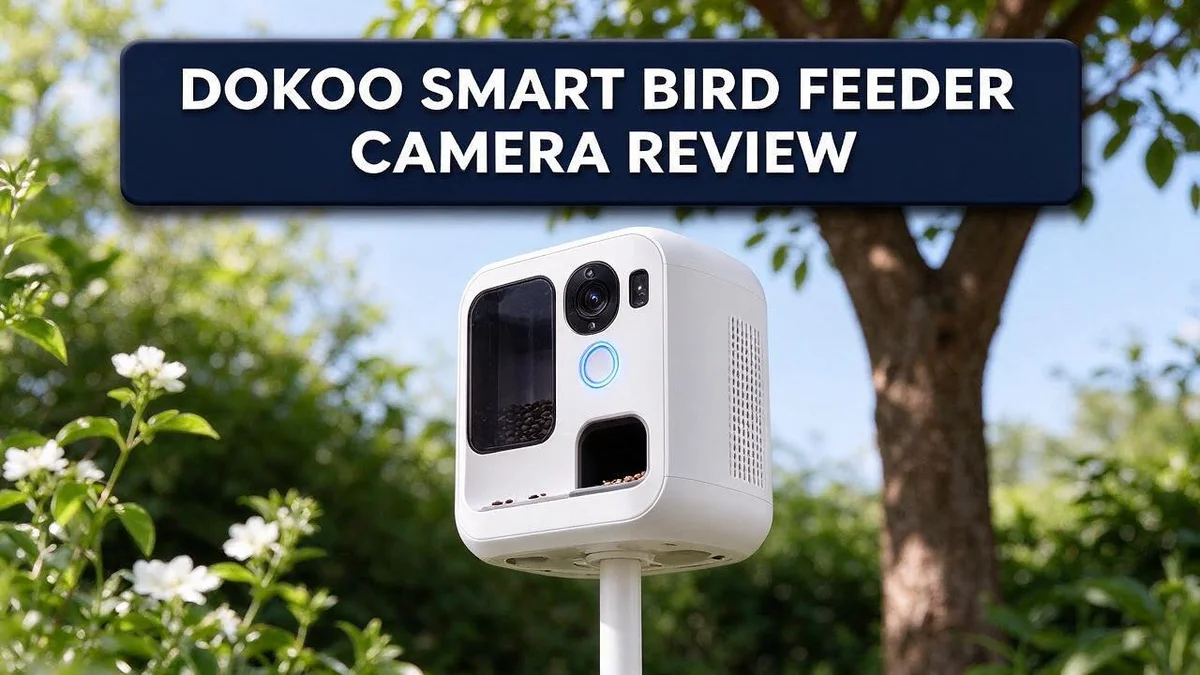
Do you love watching birds from your kitchen window? The Dokoo Smart Bird Feeder Camera brings those visits right to your phone. It pairs a feeder with a 2K camera that records bird video up close.
Bird lovers often miss the best moments. A busy garden can hide a rare visitor for hours. This camera helps you catch every flutter.
Motion detection starts recording when a bird lands. You can then open the app and watch the clip whenever you like. The camera connects to your phone over 2.4G WiFi.
Sharp images matter a lot. Some bird feeder cameras struggle with clarity, especially at night. Knowing what to look for helps you choose well.
In this review, we look at how the Dokoo camera performs in real backyards. Keep reading to see if it fits your garden.
In a Nutshell
-
2K video quality: The Dokoo camera records bird visits in 2K resolution. This gives you more visual detail than many basic feeder cameras offer, so you can spot small markings and feather patterns more easily.
-
WiFi connection: The camera links to your phone through a 2.4G WiFi app. Check that your home network supports this band before you start setup, so the connection works from the first day.
-
Green design: The unit comes in a green colorway. This shade blends well with garden plants, fences, and tree branches, so the camera looks natural in most outdoor spaces.
-
Model number: Look for model BF143 when you shop. This helps you confirm that you have the exact unit covered in this review.
-
App praise: One reviewer said the app is the best in its category by a clear margin. That comment did not name Dokoo directly, so read more owner opinions before you decide.
-
Night footage: Some bird feeder cameras produce blurry images after dark. Test the night view soon after setup, so you know exactly what to expect during early morning and evening visits.
Camera Quality and Night Vision

- AI BIRD FEEDER WITH CAMERA RECOGNITION – IDENTIFIES 10,000+ SPECIES - Experience the wonder of nature with WuzuTech's Bird Feeder. Our advanced AI technology recognizes over 10,000 bird species, making it a fun gift and educational tool for bird lovers of all ages. Instantly learn about your feathered visitors and share the joy with family and friends.
- CRYSTAL-CLEAR 2.5K HD BIRD FEEDER CAMERA – CAPTURE EVERY DETAIL - Enjoy stunning, high-definition footage of your backyard visitors with our 2.5K HD camera. Whether it's day or night, the dual-light vision ensures you never miss a moment. Relive each house visit with crystal-clear clarity and share your favorite clips with fellow bird enthusiasts.
Last update on 2026-06-10 / Affiliate links / Images from Amazon Product Advertising API Some of the links on this website are affiliate links, which means that at no additional cost to you, I earn a commission if you click through and make a purchase. I only recommend products and services that I believe will add value to my readers. Thank you for your support!
Clear pictures turn a simple feeder into a daily show. Here is how to judge the camera’s image quality in your own yard.
Daylight is the first test. Bright sun reveals color and feather detail. Watch how small birds, like finches, look in the footage.
Check the edges of the wings and tail. Soft edges can make it hard to tell species apart.
Lighting changes everything. A shady yard may look dim at noon. A sunny spot may wash out colors, so test both conditions before you settle on a location.
Background matters too. A plain backdrop helps the bird stand out. Busy hedges or bright patio lights can confuse the view and make the subject harder to see.
Night vision needs its own check. Review clips from dusk and early morning. Look for clear bird shapes instead of dark blobs.
Infrared lights can create glare on nearby glass. Place the feeder a few feet from windows. This setup helps reduce reflections in your recordings.
Camera height changes the view. Mount the unit near eye level with the perch when possible. A high angle often shows only the top of a bird’s head.
Dust and seed debris can blur the lens over time. Wipe the lens gently every few weeks. Clean glass keeps the picture bright.
Wind can shake the mount. Shaky footage looks blurry even with good optics. Tighten the bracket and secure the pole.
Rain and fog can also soften the image. Check the weather in your clips. A small cover above the lens can offer some protection.
Motion alerts work best with a clear view. A sharp image helps you identify a visitor quickly. A fuzzy image can hide small or fast birds.
Save a few recordings. Compare them after a week. Patterns show quickly, and you can adjust the angle or height.
Keep expectations realistic. Very low light limits any camera. Choose a spot with some natural light for the best results.
Motion Detection and Bird Capture
Motion detection decides how much of the action you catch. Small birds often arrive and leave in a blink. A camera that reacts too slowly can miss the best part of the visit.
Fast visitors need quick triggers. Finches and sparrows dart in and out. Watch how many short stops end up as clips after one busy morning.
Busy feeders create overlapping movement. Several birds may land at once. The camera can then record one long clip instead of many short ones. This helps when you want to watch group behavior, but single birds may be harder to follow.
Leaves and shadows can also set off alerts. A branch that sways in a light breeze may start recording for no clear reason. Place the feeder so the perch sits clear of busy branches.
Passing shadows from clouds or people can do the same thing. Review the clips after a day. Look for patterns in false starts, such as the same time of day or the same spot in the yard.
Timing shapes the final footage. A clip that starts before the bird reaches the perch shows more of the approach. Look for clips that begin with the flight in. These moments often make the best screenshots.
Daytime and dusk visits can differ. Many birds feed heavily early in the morning and late in the afternoon. Expect more clips during those windows, and check those times first.
Think about how many birds you want to catch. One perch works well for one bird at a time. Changing the feeder layout may help more birds appear in frame, so try a few setups.
Make small changes and watch the results. Start with the default setup and keep notes for a few days. Then move the feeder or adjust the angle in small steps.
A note on testing. The research for this review did not turn up detailed user reports on how Dokoo handles fast motion. That means you should test it yourself. Run it for several days in your own yard before you decide how well it captures your visitors.
App Connection and Setup
Plan your setup before you open the app. Pick a spot within range of your home router first.
The camera connects over a 2.4G WiFi band. This band usually reaches farther and passes through walls better than 5G.
Test the signal at the feeder spot. Stand where the camera will sit and check your phone’s WiFi strength. Weak signal can cause choppy video and missed alerts.
Pair the camera at ground level before you mount it. Adjusting settings from a ladder can be awkward.
Keep your phone on the main network during pairing. Guest networks often block devices from talking to each other.
Allow notifications early. Motion alerts only reach you when the app has permission to send them.
Give each camera a clear name. A label like Back Deck Feeder helps when you manage several devices later.
Write down your WiFi password before you begin. Some setups ask you to enter it twice.
Keep the app open during the first link. Switching screens can interrupt the connection between the camera and your phone.
Pairing often fails for simple reasons. A wrong password, a long distance, or a 5G only network can block the connection.
If the camera goes offline, restart your router. Then open the app and try pairing again.
Set a test alert by waving your hand near the lens. You should receive a notification soon after.
Once connected, open the live view and confirm the picture loads. This quick check saves time later.
Check for updates after setup. New app versions can improve connection stability and fix bugs.
Watch your data use. Live streaming can use more bandwidth than basic alerts, so check your plan limits.
Save your login details in a password manager. This step keeps access easy if you change phones.
Note any issue in a short log. Writing down errors helps you spot patterns.
Top 3 Alternatives
Bird Buddy Feeder

- AI-POWERED BIRDWATCHING APP: Premium Subscription required. The Bird Buddy app uses AI to identify bird species and individual birds, detect signs of illness, recognize other animal visitors, and provide real-time alerts when birds visit your feeder. Access advanced birdwatching features, personalized collections, and insights about your local wildlife through an active subscription.
- ADVANCED HD+ BIRD FEEDER CAMERA: The 2x larger sensor supports HDR for stunning contrasts and vibrant colors in 5MP photos and 2K video resolution. Unlock extra features and capture slow-motion videos of birds in flight, or enjoy a wider field of view.
Last update on 2026-07-01 / Affiliate links / Images from Amazon Product Advertising API Some of the links on this website are affiliate links, which means that at no additional cost to you, I earn a commission if you click through and make a purchase. I only recommend products and services that I believe will add value to my readers. Thank you for your support!
Bird Buddy Feeder suits people who love bird photos. Its built in camera snaps pictures when a bird lands.
The app uses artificial intelligence to name each species. This makes it fun for kids and new bird watchers. The feeder also uses solar power, so you rarely change batteries.
Netvue Birdfy Feeder

- Watch Birds from Your Phone Anytime, Anywhere. NETVUE by Birdfy smart bird feeder with camera automatically captures every coming birds and sends real-time alerts. Get close-up shots whether home or away - the perfect backyard birdwatching upgrade.
- See Birds in Stunning Detail with 2.4Ghz Wi-Fi. With full 1080P high definition resolution and color night vision, you can enjoy crystal-clear videos and images of birds—even in low light. Admire intricate feather patterns and tiny details up close, just like a bird selfie. Comes with a powerful antenna ensures a stable 2.4GHz Wi-Fi connection with wider coverage and better outdoor performance. (Please note: 5GHz Wi-Fi is NOT supported.)
Last update on 2026-07-01 / Affiliate links / Images from Amazon Product Advertising API Some of the links on this website are affiliate links, which means that at no additional cost to you, I earn a commission if you click through and make a purchase. I only recommend products and services that I believe will add value to my readers. Thank you for your support!
Netvue Birdfy Feeder offers a clean design and simple setup. Its camera records clear video of your garden visitors.
The feeder can send alerts when a bird arrives. You can stay connected while you work or travel. Wireless setup keeps installation easy.
Aura Smart Bird Feeder

- BUILT-IN CAMERA: Capture clear, close-up photos and videos of visiting birds directly from the feeder for a unique wildlife viewing experience.LIFETIME FREE AI BIRD IDENTIFICATION: Identify 10,000+ bird species for lifetime free with no monthly AI subscription. Get bird arrival alerts, explore species information and bird sounds in the app, and share access with up to 5 family members.
- 2.5K HD CAMERA WITH ROTATING VERTICAL VIEW: The 4MP camera and 150° wide-angle lens capture clear bird activity and close-up details. Rotate between landscape and vertical views for full-screen phone viewing. Color night vision captures low-light scenes.
Last update on 2026-11-19 / Affiliate links / Images from Amazon Product Advertising API Some of the links on this website are affiliate links, which means that at no additional cost to you, I earn a commission if you click through and make a purchase. I only recommend products and services that I believe will add value to my readers. Thank you for your support!
Aura Smart Bird Feeder focuses on sharp image quality. It has a weather resistant body that handles rain and wind well.
You can review photos and videos from your phone at any time. The app also helps you learn which birds visit most often. This option works well for anyone who wants a reliable daily feeder.
Weather Resistance and Mounting
Outdoor cameras face sun, cold, and moisture every day. Plan the setup before you drill any holes. A little prep saves time later.
Read the manual first for any stated weather rating. Our research did not find an official rating for this model. The manual or box label is the best place to look.
Choose a spot with some natural shelter. An overhang, eave, or tree branch can block heavy rain. Shelter helps the housing stay dry around its seams.
Watch how the sun heats the housing. Direct sun can warm the electronics quickly. Pick a shadier side of the fence or wall when possible.
Use solid anchor points. Screws should go into solid wood, brick, or a sturdy post. Thin siding may crack over time. Test each screw by tugging gently.
Plan the power route early. Check whether your model uses a cable or a battery. Run cords under eaves or through a protective tube. Loose cords can snag, freeze, or invite chewing.
Protect cables from squirrels. Squirrels love to chew plastic and wire. Keep cables short and covered. Mount the camera away from branches they can jump from.
Prepare for winter weather. Cold temperatures can drain batteries faster than usual. Check charge levels before the first frost arrives. Keep spare batteries indoors where they stay warm.
Snow and ice need gentle care. Brush snow off the lens and the feeder roof. Avoid sharp tools that could scratch the glass.
Schedule regular inspections. Look for cracked seals, loose screws, or worn cables every few months. Storms can loosen parts without warning. Quick checks catch small problems early.
Keep a simple maintenance log. Write down the install date, any major storms, and repairs. Patterns become clear over a season. This record also helps you spot early wear.
A solid mount protects your camera and your time. Take a few extra minutes now, and your feeder camera can keep watching for years.
Feeder Design and Cleaning
Feeder design affects both bird health and video quality. Simple shapes are easier to reach and wipe down. Look for parts that come apart by hand.
Check the perch and seed tray first. Open perches help birds land and balance with ease. Raised tray edges keep seed from spilling onto the ground below.
Drainage matters more than most people expect. Rain can pool in the seed area. Damp seed can grow mold, and moldy seed can make birds sick.
Look for small drainage holes in the base. Make sure the lid sits firmly but lifts off easily. A lid that traps water will cause trouble fast. Tighten any screws or clips after each wash.
Set a regular cleaning schedule. Most bird feeding guides recommend cleaning feeders every week or two. Busy feeders may need attention more often.
Use warm water and a mild dish soap. Scrub every part with a soft brush. Rinse well and let everything dry fully before you refill it.
Avoid harsh chemicals near the seed area. Strong cleaners can leave a residue that birds may avoid. A diluted vinegar solution works well for stubborn grime, but rinse it away completely.
Protect the camera while you clean. Remove the camera module or cover it before you spray anything. Wipe the lens with a soft, dry cloth to keep images sharp.
Clear footage depends on a clean lens. Dust, water spots, and bird droppings can blur the view. A quick wipe after each cleaning session makes a big difference.
Check the manual before washing any electronics. Our research did not find details on Dokoo’s materials or whether parts are dishwasher safe. Follow the maker’s instructions to avoid damage.
A little routine goes a long way. Clean feeders attract more birds and give you better footage. Keep a simple checklist near the feeder so the routine stays easy. Enjoy watching your feathered visitors.
Pros and Cons
Pros
– The 2K camera captures sharp bird video.
– Motion detection helps you catch visitors as they arrive.
– The WiFi app connects the camera to your phone.
– The green finish suits a garden setting.
Cons
– Some bird feeder cameras produce blurry night footage.
– Clarity can drop on certain bird feeder camera models.
– Our research found no Dokoo-specific drawbacks, so test the night view yourself.
– Few public user reviews make long term results hard to judge.
Who Should Buy It
Bird lovers who enjoy daily wildlife moments will likely get the most from this camera. It suits people who want to learn which species visit their yard. Each clip can reveal a new visitor, and over time the feeder becomes a small nature show.
Beginners also make good candidates for this setup. You do not need expert knowledge to start watching. Simple viewing helps new fans build confidence quickly.
Families with children can use it as a learning tool. Kids can spot jays, finches, and woodpeckers on screen. Shared viewing often sparks curiosity about nature.
Busy people may enjoy checking the yard from work or while traveling. A quick look at the app can bring a bit of nature into a hectic day.
Window watchers get a clear view without leaving the couch. Anyone who loves quiet mornings with coffee can enjoy the action from indoors.
Retirees and home workers often spend long days near windows. A feeder camera gives them a steady stream of small surprises.
Teachers and nature clubs can share clips during lessons or meetings. Real footage from a backyard feels fresh and relatable to students.
Gift buyers often look for something both fun and useful. This camera suits a friend who already feeds birds. A short note about the app setup can make the gift feel thoughtful.
Some shoppers may want to wait. People who need proven long term results should look for more feedback. Our research found few public reviews to judge durability over time.
Shoppers who expect automatic bird identification may feel let down. Our research did not confirm any species recognition feature. Check the specs carefully before you decide.
Bottom line: the camera fits casual watchers, families, and gift givers best. Anyone seeking a fully documented track record should test it carefully first.
Final Verdict
The Dokoo Smart Bird Feeder Camera looks like a solid pick for backyard watchers. It offers a clear view, easy phone access, and simple motion alerts. Many shoppers want exactly that mix.
Our research did not find many Dokoo specific pros or cons. That gap matters. Still, one reviewer praised the app, which suggests the phone experience may stand out.
Test it before you trust it. Set up the camera at dusk and check the night footage. Night views are where many bird feeder cameras struggle.
Think about your daily routine too. A camera works best when you check it often. Pick a set time, such as morning coffee, to look at the feed. If you rarely open your phone, the camera may sit unused.
Who should say yes? Choose this model if you want a simple setup. It also suits anyone who enjoys watching birds in the yard.
Who should wait? Shoppers who need proven results over a long time may want more evidence. Few public reviews exist yet, so the track record is still short.
Keep your expectations realistic. Weather, lighting, and feeder placement shape what you see. A sunny spot near a window often gives the best footage. Patience pays off in the first week.
Also look at how the camera fits your space. Balconies, small patios, and wide yards each need different mounting. Measure your spot before you buy so setup goes smoothly.
Plan your cleaning routine from the start. A clean lens and clean seed tray keep both birds and footage healthy. Dust and rain can blur the view fast, so make cleaning a habit.
Our bottom line: the Dokoo camera looks promising for casual and beginner use. Confirm the night view and app experience first. Then decide with confidence.
Frequently Asked Questions
Where should I place the camera?
Mount it at eye level near the feeder. Point the lens away from direct sunlight. This helps reduce glare and keeps the video clear.
Will birds get used to the camera?
Many birds adjust to new objects within a few days. Keep the setup steady during that time and avoid moving the feeder often.
Can I share bird clips with others?
Save clips from the app to your phone. Check the app for sharing options, since our research did not confirm them.
Does my WiFi reach the feeder?
Test your signal at the feeder spot before you mount the camera. Weak WiFi can cause lag or dropped video.
Is this camera useful for learning about birds?
Yes, it works well for casual learning. Pair the clips with a bird guide to identify species. Kids often enjoy spotting patterns in visitor habits.

Hello, I’m Amelia White, the founder of birdsfanatic.com. As a lifelong bird enthusiast and spiritual seeker, I’ve always been fascinated by the mystical connections between birds and the human experience. On this site, I share my knowledge and insights into the symbolic meanings and spiritual significance of various bird species, exploring their roles in mythology, folklore, and cultural traditions. Join me on this journey into the world of birds, where we’ll discover the hidden wisdom and guidance that these magnificent creatures have to offer.