Kiwibit Bird Feeder 2 4K AI Camera Review: Complete Guide
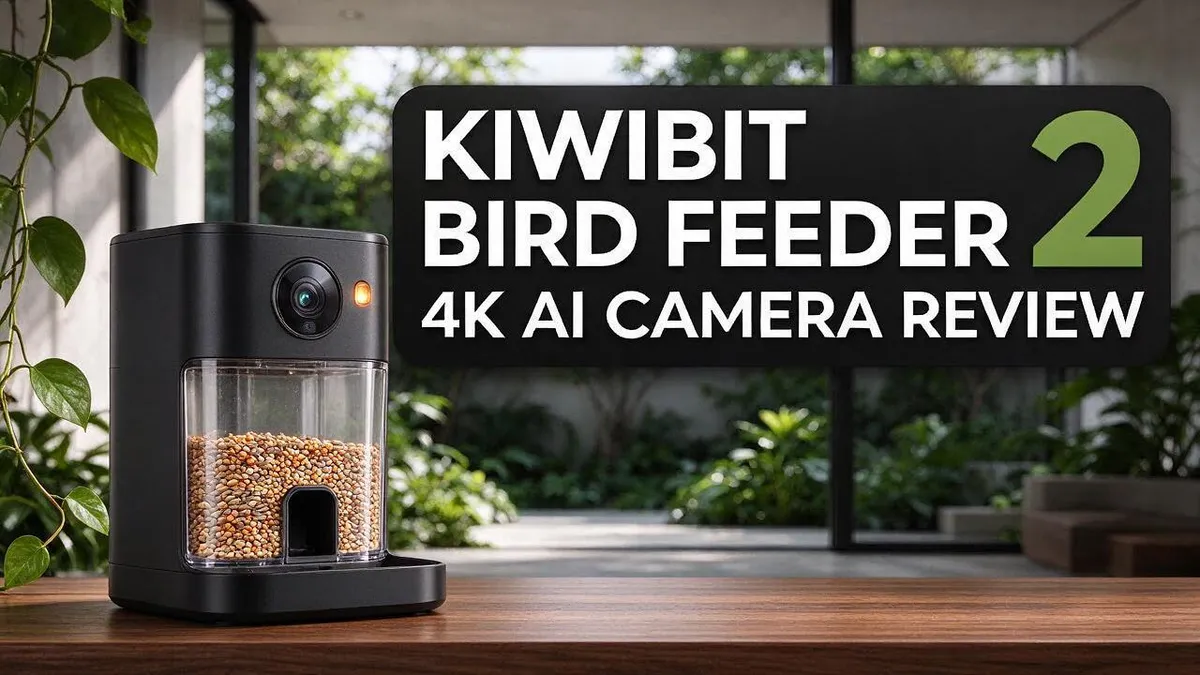
Do you love watching birds from your kitchen window? Your backyard visitors deserve a closer look. The Kiwibit Bird Feeder 2 4K AI Camera brings every feather and color into sharp focus.
It streams 4K Ultra HD video from an 8MP sensor. The 132 degree wide angle lens captures more of the feeding area. Even night visits look clear thanks to enhanced night vision.
Power never becomes a chore. Dual integrated solar panels keep the removable battery charged. You do not need a ladder to recharge it.
In a Nutshell
- A wide view of your garden: The 132° lens captures a large feeding area. You can see more visitors at once without moving the camera.
- Clear views after dark: Enhanced night vision lets you watch late visitors. Dusk and early morning birds stay in view too, so you never miss the quiet hours.
- Room for two seed types: The 1.5L hopper has two separate compartments. You can fill each side with a different mix and see which one your favorite birds prefer.
- A battery you can remove: The 5,200mAh battery pulls out for easy charging. Keep a spare ready for cloudy days or long stretches of winter gloom.
- No subscription for AI features: The lifetime AI plan means you never need a monthly plan to manage. Bird identification works from the start, with no extra sign ups to worry about.
- Close-up feather detail: The camera shows fine feather patterns and bright colors. The Pro model adds 32MP photos and 4K HDR for even sharper shots.
Camera Image Quality

- 4K Bird Feeder Camera: Capture every visitor in stunning 8MP photos and 4K Ultra HD video with an advanced high-resolution sensor. HDR reveals vibrant colors and rich contrast, while the 132° ultra-wide lens captures every moment around the feeder. The Perch Extender welcomes birds of all sizes. After dark, infrared night vision records clear black-and-white footage. Built-in two-way audio lets you listen and interact in real time
- AI Bird Identification: Powered by Kiwibit’s advanced AI for more precise recognition, identifies 10,000+ bird species and sends real-time alerts when birds visit your feeder. Explore fascinating facts, view auto-generated summaries and KeyShot galleries, and easily share with up to 20 family members or friends. AI features require Kiwibit Premium subscription and include a 30-day free trial
Last update on 2026-06-10 / Affiliate links / Images from Amazon Product Advertising API Some of the links on this website are affiliate links, which means that at no additional cost to you, I earn a commission if you click through and make a purchase. I only recommend products and services that I believe will add value to my readers. Thank you for your support!
Clear pictures make a bird feeder fun to use. When images look sharp, you notice tiny details fast. This section explains how the camera performs in everyday watching.
Uncompressed streaming keeps the picture true to life. Many cameras squeeze video, which can blur fine lines. With this model, your feed keeps its natural look.
Colors stay rich in morning light. Soft sunrise tones can wash out on basic lenses. Bright reds and blues of visiting finches look lively.
Fast wings are hard to capture. Birds rarely sit still, so motion tests any camera. Watch how your feed handles quick flights during the first week.
The Pro model adds bigger photos. It offers 32MP photos and 4K HDR for extra detail. These extras help when you want to crop or print a favorite shot.
Sharp stills help with bird identification. The AI looks for clear markings on wings and heads. A crisp frame gives the software more detail to read.
Lighting shapes every shot. Harsh midday sun can create bright spots and shadows. A shaded perch often gives the most even colors.
Placement changes results too. Point the lens at the perch and avoid glare from windows. Small setup choices can lead to better footage.
Glare from glass needs attention. Reflections can hide birds on a sunny day. Angle the feeder away from bright windows, or add a shade cover above the perch so the picture stays clear.
Night footage shows a different side. Enhanced night vision records late visitors, though colors may look softer than daytime shots.
Clean the lens for the best view. Dust, rain spots, and seed dust can soften the picture over time. A soft cloth wipes away most marks in seconds.
Overall, image quality feels impressive. Sharp video, bright colors, and detailed stills make watching enjoyable. Test a few spots before you settle on one.
Solar Power and Battery
Sunlight does most of the work with this feeder. The dual integrated solar panels soak up daylight and keep the battery charged. Two panels mean more chances to catch light.
Solar charging means you never need a ladder to recharge. You simply let the sun do the work.
Placement matters a lot. A spot with several hours of direct sun gives the panels the best chance to charge. A shady corner under dense trees can slow things down.
Cloudy weeks test any solar device. On gray days, the camera relies on energy stored in the battery. Check the battery level often so you know how it handles dim skies.
Your removable battery offers a useful backup. If clouds stick around for days, pull the battery and charge it indoors. Then slide it back in when it is ready.
Winter brings its own challenges. Snow or frost can cover the panels and block light. Brush them off gently with a soft cloth after storms.
Dust and bird droppings can also reduce charging. A quick wipe every few weeks keeps the panels clear. Seasonal checks help too, since the sun moves across the sky over the year.
Frequent visits and live viewing draw power from the battery. Sunny spells help it recover after busy feeding hours. Plan for those bright stretches.
Many people place the feeder near a window for easy viewing. Just check that the panels still face open sky. A clear view of the sky keeps charging steady all season.
Adjust the feeder angle when the seasons change. Small tweaks can catch more light. Understanding these basics makes daily care easy. Simple habits protect your battery and keep the camera running day after day.
Seed Hopper Design and Capacity
The seed hopper shapes how often you visit the feeder. Refill days depend on how many birds arrive.
Busy gardens empty the hopper fast. Quiet spots may last a week or more.
Seed stays dry when the lid closes snugly. Damp seed clumps and can spoil quickly.
Check the seal after heavy rain. A loose lid lets water seep inside and ruin the mix.
Most birds prefer clean seed. Wipe out old husks and dust every couple of weeks.
Filling from the top takes only seconds. Lift the lid, pour, and close it again.
Seed weight also affects the mounting. A full hopper hangs heavier, so check the hook and bracket.
Keep a small scoop nearby. It makes refills tidy and stops spills on the ground below.
Fill the hopper in the morning. Birds feed most then, so fresh seed draws more visitors.
Mix your seed for variety. Blend sunflower, millet, and peanut pieces. Different birds prefer different foods.
Avoid bread and salty snacks. These foods fill birds up without giving them good nutrition.
Track how fast seed disappears. A simple log helps you learn which days bring the biggest crowds.
Winter demand rises sharply. Birds need extra energy in cold weather, so top up more often.
Store spare seed in a sealed bin. Cool, dry storage keeps it fresh and blocks mice.
Clean the hopper before each refill. Rinse with warm water and let it dry fully.
Check the feeding tray too. Spilled seed collects there and can attract pests if left alone.
A well designed hopper saves time. It keeps seed dry, clean, and ready for visiting birds.
Good habits make the hopper easy to manage. A quick weekly look keeps the feeder ready for every visitor.
Top 3 Alternatives
Bird Buddy Smart Feeder

- AI-POWERED BIRDWATCHING APP: Premium Subscription required. The Bird Buddy app uses AI to identify bird species and individual birds, detect signs of illness, recognize other animal visitors, and provide real-time alerts when birds visit your feeder. Access advanced birdwatching features, personalized collections, and insights about your local wildlife through an active subscription.
- ADVANCED HD+ BIRD FEEDER CAMERA: The 2x larger sensor supports HDR for stunning contrasts and vibrant colors in 5MP photos and 2K video resolution. Unlock extra features and capture slow-motion videos of birds in flight, or enjoy a wider field of view.
Last update on 2026-07-01 / Affiliate links / Images from Amazon Product Advertising API Some of the links on this website are affiliate links, which means that at no additional cost to you, I earn a commission if you click through and make a purchase. I only recommend products and services that I believe will add value to my readers. Thank you for your support!
The Bird Buddy Smart Feeder is a popular choice for bird lovers. It has a built-in camera that takes sharp photos when birds visit. You get instant alerts on your phone.
Setup is easy. Fill the seed tray and place the feeder outside. Many people enjoy building a photo collection of their favorite visitors. The app also helps you learn which species show up in your yard.
Netvue Birdfy Feeder

- Watch Birds from Your Phone Anytime, Anywhere. NETVUE by Birdfy smart bird feeder with camera automatically captures every coming birds and sends real-time alerts. Get close-up shots whether home or away - the perfect backyard birdwatching upgrade.
- See Birds in Stunning Detail with 2.4Ghz Wi-Fi. With full 1080P high definition resolution and color night vision, you can enjoy crystal-clear videos and images of birds—even in low light. Admire intricate feather patterns and tiny details up close, just like a bird selfie. Comes with a powerful antenna ensures a stable 2.4GHz Wi-Fi connection with wider coverage and better outdoor performance. (Please note: 5GHz Wi-Fi is NOT supported.)
Last update on 2026-07-01 / Affiliate links / Images from Amazon Product Advertising API Some of the links on this website are affiliate links, which means that at no additional cost to you, I earn a commission if you click through and make a purchase. I only recommend products and services that I believe will add value to my readers. Thank you for your support!
The Netvue Birdfy Feeder offers smart features for busy people. It uses a camera and motion sensors to spot birds quickly. Its AI can identify bird species right in the app.
This feeder works well for beginners. The setup takes only a few minutes. You can also watch live video from anywhere you have a connection.
Tangkula Bird Feeder Camera

- Live Birdwatching, Anytime, Anywhere: Watch birds visit your bird feeder with camera in real-time with 2K HD video streaming straight to your phone. Whether you’re at home or away, never miss a moment as birds stop by, bringing nature closer than ever. You can even use it as an additional security camera.
- AI Bird Recognition with Free Trial: Identify 10,000+ bird species with AI-powered recognition. Enjoy a one-month free trial, after which you can choose to subscribe flexibly on a monthly or yearly basis.

Last update on 2026-06-09 / Affiliate links / Images from Amazon Product Advertising API Some of the links on this website are affiliate links, which means that at no additional cost to you, I earn a commission if you click through and make a purchase. I only recommend products and services that I believe will add value to my readers. Thank you for your support!
The Tangkula Bird Feeder Camera is a solid option for a simple setup. It comes with a camera that records bird activity. You can save clips and photos right on your device.
This model suits families and kids. Children love seeing birds up close. It helps everyone learn about backyard wildlife in a fun way.
AI Bird Identification
The AI in this feeder does more than label a photo. It also helps you learn who visits your yard.
Each visit gets a species name. The system compares every bird with a library of known types.
Common backyard guests appear fast on screen. Unusual visitors may need a second look from the camera.
This makes the feeder a handy teaching tool for the whole family. Kids love spotting new birds and saying their names out loud.
Pro owners get extra recognition help. The FeatherPal™ feature helps tell similar birds apart.
Similar species can look alike at first glance. Finches and sparrows often confuse new bird fans.
The system gives stronger guesses when the bird stays in view. A steady pause on the perch helps the camera do its job.
Always check surprising results before you share them. AI guesses work best as a starting point, not a final answer.
Over time, your sightings build a helpful picture of your yard. You can see which species return each season.
Seasonal patterns become easy to spot. Some birds arrive in spring, while others stay put all winter.
Watching these changes can spark curiosity about migration. Each new name leads to a fresh question.
Sharing your sightings with neighbors adds fun to the hobby. Friends often bring their own photos to compare.
Keep the lens clean for better names. A smudge can blur the markings the AI needs to see.
Good light and a clear view matter most for each guess. With these habits, your feeder becomes a reliable bird guide.
Patience pays off with this feature. Some species show up only once a week, so keep watching the feed.
Small wins build confidence over time. Every correct name makes the hobby feel more rewarding.
Installation and Setup
Setting up your new feeder takes less time than you might expect. Start by unboxing the unit and laying out every part on a table. Check the lens, the hopper, and the mounting bracket before you begin.
Charge the battery first. Insert the removable battery and let it charge fully before you mount the feeder. A full charge gives the camera a strong start.
Next, download the companion app on your phone. Create an account, then follow the steps shown in the app to connect the camera to your home internet. Keep your phone close to the feeder during this step so the signal stays strong.
Name your feeder in the app. A clear name helps you find it quickly in a list of devices. Turn on notifications if you want alerts when a bird lands.
Mounting comes after the app is ready. Choose a sturdy pole, post, or rail that can hold the weight of a full hopper. Tighten every bolt so the feeder does not wobble in the wind.
Grab a screwdriver and a small level before you start. A level helps you keep the feeder straight. Straight mounting protects the seed and keeps the camera view steady.
Test the view before you finish. Open the live feed in the app and look at the frame. Make sure the perch and feeding ports appear clearly on screen. Small adjustments now save you trouble later.
Update the software right away. Newer firmware often adds features and fixes bugs. Let the feeder finish the update before you fill it with seed.
Finally, run a short test day. Watch the feed for a few hours and note how the camera records movement. This quick check shows you whether everything works as planned. Keep the instruction booklet handy for reference.
Pros and Cons
Pros
- Solar charging means you rarely need a ladder to recharge.
- A lifetime AI plan means no subscription to manage.
- Close-up views show fine feather detail and bright colors.
- Most owners find the installation easy to complete.
- The wide view covers the whole feeding area.
Cons
- Solar panels need steady daylight, so gloomy weeks may require a manual charge.
- Pro-only features like 32MP photos are not part of the base model.
- Distant birds may appear too small for accurate identification.
- You need the phone app to get the full experience.
Who Should Buy It
Some bird lovers will enjoy this feeder more than others. Here is a closer look at who should consider it.
Busy households make a great match. You can glance at the app during a coffee break and see who stopped by. There is no need to stare at the window all day.
Retirees and homebound readers also gain a lot. Watching birds from a favorite armchair feels calm and rewarding. The live feed brings the yard indoors, even on a rainy afternoon.
Families spread across distance can connect too. Grandparents can share the live view during a video call. Everyone can point out a new visitor together, which builds a shared hobby.
Citizen science fans should take note. Many people log sightings to help local researchers track bird trends. Your history inside the app gives you a clear record of seasonal guests.
Balcony and patio owners can also join in. A small outdoor space works well if it gets good daylight. Hang it where the camera has a clear view of the perches.
Some people should look elsewhere. Those who want a simple feeder with no phone involved may feel frustrated. This model asks for a phone and some comfort with apps. Shady yards may also limit solar charging, so plan the spot before you buy.
Shoppers who only want a basic seed dish may not need the camera features. A simple feeder asks for less setup and fewer decisions. Choose it if camera tools feel like extra clutter to you.
Pick it if you want a smart window on wild birds. It suits people who enjoy learning, sharing, and slow mornings with coffee. Think about your phone habits and your sunny spot first, then decide with confidence.
Final Verdict
The Kiwibit Bird Feeder 2 4K AI Camera earns a strong overall score. It blends sharp video, solar power, and smart bird identification in one unit.
The 4K video and 8MP sensor deliver a crisp picture. Enhanced night vision keeps the show going after sunset.
Our research listed no drawbacks. That does not mean every yard is a perfect match. Your setup still matters a lot.
Check your sun exposure before you buy. Panels work best in a spot that gets steady light through the day. Shade can slow the charging.
Think about how you plan to use the images. Photo lovers may get more value from the Pro model’s sharper stills and extra features. Casual watchers may be happy with the base model.
The two compartment seed hopper gives you room to experiment. Offer two seed types side by side and you may attract a wider mix of species.
A spare battery makes a smart backup. Keep one charged indoors so the feeder never goes dark during long gray spells.
Think about your daily routine too. A feeder that streams live video fits well into a busy schedule. You can check visitors during a coffee break or after work.
Give the feeder at least a few weeks. Seasonal changes shape which birds show up, so a short look may tell only part of the story.
Plan a quiet spot for the feeder too. A clear view from a nearby window helps the camera capture better frames.
Finally, compare the feeder with your own expectations. Write down what matters most, such as video quality, photo detail, or easy setup. Then decide.
In short, this feeder suits curious people who want a closer look at their garden. Start with a clear goal, and the camera will reward your patience.
Frequently Asked Questions
Does the camera work at night?
Yes, the feeder includes enhanced night vision. You can still check on your visitors after the sun goes down. Night views help you spot late feeders, like owls or raccoons, so you can see who stops by when your yard is quiet. Keep the lens clean for the clearest images.
Does the AI name every bird?
The feeder uses AI bird identification to label the visitors it sees. The Pro model adds FeatherPal bird recognition for extra detail. Birds that sit close to the lens give the AI the best chance to get the name right.
How much seed can it hold?
The seed hopper holds 1.5 liters of food. That is enough to keep a steady crowd fed between refills. Check the level each week, especially during busy spring and fall months, so your guests never run out.
Is this feeder a good fit for beginners?
Yes, beginners often find it easy to start. The app shows live views, so you can learn bird names as you watch. Set up the feeder, open the app, and spend a few minutes each day exploring what visits your yard.

Hello, I’m Amelia White, the founder of birdsfanatic.com. As a lifelong bird enthusiast and spiritual seeker, I’ve always been fascinated by the mystical connections between birds and the human experience. On this site, I share my knowledge and insights into the symbolic meanings and spiritual significance of various bird species, exploring their roles in mythology, folklore, and cultural traditions. Join me on this journey into the world of birds, where we’ll discover the hidden wisdom and guidance that these magnificent creatures have to offer.